On this page
Kiosk surveys have become a powerful way for organizations to gather real-time feedback from employees and customers—right at the point of experience. Delivered through touchscreen devices placed in physical locations, they make feedback accessible to deskless workers, frontline teams, and walk-in audiences who are often missed by traditional survey methods.
By offering a simple, quick, and intuitive format, kiosk surveys help increase participation, improve inclusivity, and deliver timely insights that drive better decisions. With kiosk surveys, we can:
- Capture feedback instantly when experiences are fresh
- Reach deskless and digitally disconnected audiences
- Encourage higher response rates with minimal friction
- Support inclusive feedback through multilingual, on-location access
In this blog, we’ll cover:
- The meaning and functionality of kiosk surveys
- Types of kiosk surveys with practical examples
- How to set up a kiosk survey for success
- How Empuls supports kiosk-based feedback collection
- Best practices to maximize participation and impact
- FAQs to help you get started
What is a kiosk survey?
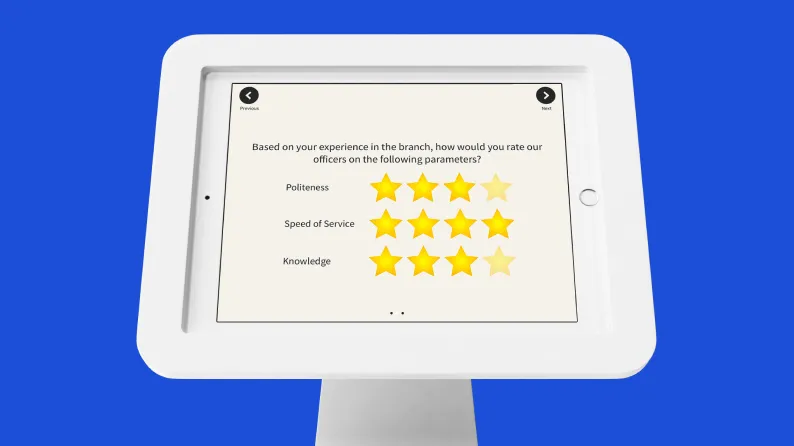
A kiosk survey is a type of survey deployed on a digital device—typically a tablet, touch screen, or kiosk stand—placed in a physical location to collect real-time feedback from users. These surveys are designed for quick, on-the-go interactions, allowing respondents to provide input immediately after an experience, task, or shift.
Unlike traditional online surveys sent via email or mobile apps, kiosk surveys are placed where the interaction happens—making them ideal for capturing timely and context-rich feedback. They are particularly effective in workplaces where employees may not have regular access to computers or corporate email, such as in manufacturing, retail, logistics, or healthcare environments.
A typical kiosk survey example might include:
- A tablet at the exit of a factory asking workers how they felt about safety measures during their shift.
- A touchscreen in a hospital staff lounge collecting feedback on cafeteria services.
- A device near a retail staff punch-out station asking about the day’s workload or customer interactions.
Kiosk surveys typically feature:
- Short, tap-friendly question formats (rating scales, emojis, yes/no)
- Resetting interfaces to prepare for the next respondent
- Offline capabilities with data sync when internet is available
- Optional QR codes for mobile participation
Empuls supports kiosk survey deployments that enable HR teams to reach non-desk and field employees in real time. By integrating survey results into its broader employee engagement ecosystem, Empuls helps turn frontline feedback into actionable insights.
Types of kiosk surveys
Kiosk surveys are versatile tools used across industries and functions to capture feedback at the moment it matters most. Depending on their purpose and placement, these surveys can serve a variety of organizational goals—from improving service delivery to measuring employee sentiment.
Here are the most common types of kiosk surveys:
1. Transactional kiosk surveys
These are placed immediately after a transaction or interaction—whether it’s clocking out of a shift, completing a medical consultation, or finishing a training module. They aim to capture feedback while the experience is still fresh in the respondent’s mind.
Kiosk survey example: A logistics hub places a tablet at the exit where drivers rate how smooth their check-in and loading experience was that day.
2. Customer satisfaction (CSAT) surveys
In customer-facing environments, kiosk surveys help assess satisfaction levels on the spot. The simplicity of a touchscreen with emoji ratings or a 1–5 scale makes them easy and inviting to complete.
Example: A retail store installs a survey kiosk near the checkout asking, “How was your shopping experience today?”
3. Net Promoter Score (NPS) surveys
NPS-focused kiosk surveys ask users how likely they are to recommend a product, service, or brand on a 0–10 scale. This data helps businesses gauge loyalty and predict retention trends.
Example: At a bank branch, customers are prompted to answer the NPS question after completing a service request.
4. Employee or frontline surveys
These are designed specifically for organizations with large deskless or field-based workforces. Employees who don’t regularly use email or digital workspaces can still share valuable feedback on safety, leadership, facilities, or morale.
Kiosk survey example: A manufacturing plant sets up a kiosk in the break room to collect daily feedback on shift conditions and supervisor support.
5. Event or training feedback surveys
Placed at event venues or learning environments, kiosk surveys can quickly gather insights from participants while the experience is still top-of-mind.
Example: After a company town hall, attendees rate the session’s usefulness and engagement level at a kiosk near the exit.
These different types of kiosk surveys help organizations reach audiences that are often hard to engage through conventional survey channels. Empuls enables seamless deployment of all these formats—integrated with your feedback strategy—ensuring a complete view of employee sentiment, regardless of role or location.
How kiosk surveys work
Kiosk surveys operate through a simple yet powerful setup: a digital interface installed on a dedicated device—usually a tablet or touchscreen terminal—placed in a high-visibility, high-footfall area. The goal is to make feedback collection seamless, frictionless, and available to everyone, especially those who may not be sitting at a desk or logged into a computer.
Here's how the process typically works:
1. Easy-to-use interface
Kiosk surveys are designed with simplicity in mind. The interface includes:
- Large buttons and touch-friendly response options
- Visual elements like emojis or sliders to increase ease of use
- Language options for inclusive participation
- Auto-reset to home screen after each submission to prepare for the next respondent
2. Smart hardware placement
The success of a kiosk survey heavily depends on where it's placed. Ideal locations include:
- Near exits or punch clocks in factories or warehouses
- Staff lounges or common areas
- Lobbies, cafeterias, or training rooms
- Entry/exit points at events or clinics
These placements ensure the survey is seen, accessible, and contextually relevant.
3. Real-time data capture
Once submitted, responses are uploaded instantly to a centralized dashboard. In cases where internet connectivity is unstable, kiosk surveys often include offline functionality, syncing responses once a connection is re-established.
4. Device configuration and control
Admin teams can configure the kiosk remotely:
- Lock the screen to one survey
- Control display timing and question rotation
- Enable QR-code alternatives so users can respond on their phone if they prefer
5. Integrated analytics and insights
Feedback is funneled into your analytics platform—like the dashboards within Empuls—allowing HR or ops leaders to monitor trends, filter by location, and take timely action.
With Empuls, organizations can deploy kiosk surveys that are fully integrated with employee feedback workflows. Whether it's gathering pulse responses from deskless workers or capturing sentiment after a training session, Empuls ensures the survey process is secure, scalable, and insight-driven.
How to set up a kiosk survey?
Setting up a kiosk survey is more than placing a tablet on a stand. It requires thoughtful planning around design, deployment, and user experience to ensure maximum participation and actionable feedback. Here's a step-by-step guide to getting it right:
1. Define the goal of your kiosk survey
Start by identifying the purpose. Are you collecting employee feedback, post-shift reflections, event impressions, or service ratings? Your objective will shape everything—from the question types to placement.
2. Choose the right device and mounting solution
Decide whether you'll use tablets, touchscreen monitors, or dedicated survey kiosks. Choose durable hardware that can withstand high usage, especially in industrial or public environments.
- Touch responsiveness
- Sturdy kiosk stands or wall mounts
- Battery life or power source availability
- Screen glare and protective casing (especially for outdoor or factory use)
3. Select a survey platform with kiosk mode
Not all survey tools support kiosk mode. Choose a platform like Empuls that allows:
- Locking the device to one survey
- Auto-reset after submission
- QR-code fallback
- Offline data collection with sync
- Secure access control and data privacy
4. Design your kiosk survey for quick completion
Kiosk surveys should take no more than 1–2 minutes. Keep questions:
- Short and clear (3–5 questions max)
- Visual (use emoji ratings or sliders)
- Multilingual if needed
- Tap-friendly (large buttons and minimal scrolling)
“How safe did you feel during your shift today?”
🟥 🟧 🟨 🟩 🟦 (color-coded scale)
5. Pick the ideal placement
Position your kiosk in a high-traffic but non-disruptive area—where people have a natural pause. Ideal locations include:
- Break rooms
- Near exits/punch stations
- Reception areas
- Outside training rooms or event halls
Visibility, accessibility, and context are critical. A poorly placed kiosk will get ignored.
6. Test thoroughly before launch
Run a pilot with a small group. Observe:
- Is the interface easy to use?
- Are people completing the survey or abandoning it?
- Are any questions misunderstood?
Make adjustments based on real feedback, then scale.
7. Monitor participation and maintain the device
Track usage trends and survey completions daily or weekly. Also:
- Keep the screen clean
- Ensure internet or sync functionality is stable
- Rotate questions regularly to avoid fatigue
How Empuls supports kiosk surveys for employee feedback
Empuls helps organizations bring the voice of every employee to the forefront—especially those who are often left out of traditional feedback loops like field teams, shop floor workers, and frontline staff. Our kiosk survey capability ensures that feedback collection is not limited to employees with email access or desk jobs.
Here’s how Empuls makes kiosk surveys seamless and impactful:
1. Kiosk-ready survey interface
Empuls supports touch-optimized, minimal-tap surveys that reset automatically for the next respondent. The interface is designed for speed, ease, and privacy—ideal for factory floors, hospitals, retail counters, or common areas.
2. QR-code access for added flexibility
Not every employee prefers to use the kiosk. Empuls allows employees to scan a QR code on the kiosk and complete the survey on their mobile device, improving response rates and comfort.
3. Offline functionality
Empuls enables data collection even in low or no internet environments. Survey responses are stored locally and synced to the dashboard once connectivity resumes.
4. Multilingual and inclusive design
Surveys can be deployed in multiple languages to support diverse and global teams, ensuring that every voice is heard—regardless of background or location.
5. Real-time analytics and insights
Survey results from all kiosks are aggregated into Empuls' centralized analytics dashboard, giving HR and managers immediate visibility into trends, sentiment, and red flags across teams, shifts, or locations.
6. Action loop automation
Empuls doesn’t stop at collecting feedback. It helps close the loop by enabling automated nudges, manager alerts, and visible responses to employee feedback—building a culture of listening and action.
Whether you need to gather shift-end feedback, safety observations, or pulse surveys for field teams, Empuls provides a secure, scalable, and data-driven approach to running kiosk surveys across any location.
Empuls helps you deploy touch-friendly kiosk surveys that capture real-time feedback from deskless employees—anywhere in the world.
👉 Talk to our experts
Tips for effective kiosk surveys
A well-designed kiosk survey can be a powerful tool for collecting meaningful feedback—if executed with purpose. Here are best practices to ensure effectiveness, usability, and high response rates:
1. Keep surveys short and focused
Limit each kiosk survey to 3–5 questions. Keep the language clear and straightforward, with easy-to-understand response options such as rating scales or yes/no questions.
2. Choose high-traffic, accessible locations
Place kiosks in areas where employees naturally pause, such as near exits, break rooms, time-clocking stations, or training rooms. Accessibility directly impacts participation.
3. Refresh surveys regularly
Update your survey questions every few weeks to maintain engagement and prevent response fatigue. This also allows you to collect a wider range of insights over time.
4. Ensure anonymity and privacy
Avoid asking for personally identifiable information unless absolutely necessary. Let respondents know their answers are anonymous, especially when collecting feedback on management, safety, or well-being.
5. Design with inclusivity in mind
Ensure the interface supports multiple languages, large tap targets, and high-contrast visuals to accommodate diverse users, including those with accessibility needs.
6. Maintain the device experience
Keep screens clean, ensure the device is charged or powered, and confirm that software is functioning correctly. A neglected kiosk signals a lack of commitment to feedback.
7. Monitor participation and trends
Track response rates and patterns using your survey platform. This data can reveal gaps in engagement and help you adjust placement, timing, or survey design accordingly.
8. Close the feedback loop
Share survey insights and actions taken with employees to reinforce that their input leads to meaningful change. These builds trust and encourages ongoing participation.
Use Empuls to gather actionable feedback with kiosk surveys that integrate seamlessly into your engagement strategy.
👉 Book a personalized demo
Conclusion
Kiosk surveys are a practical and impactful way to gather timely feedback—especially from employees who are offline, on the field, or part of the deskless workforce. By placing simple, accessible surveys in high-traffic areas, organizations can capture real-time insights that would otherwise go unheard.
More than just a tool for collecting data, a kiosk survey is a gateway to building a culture of responsiveness and inclusion. Whether you're measuring shift satisfaction, gathering safety observations, or evaluating training sessions, these surveys allow you to listen at the point of experience.
Empuls helps you extend your feedback strategy beyond digital workspaces—enabling scalable kiosk surveys that are easy to deploy, simple to complete, and actionable by design. When every employee has a voice, your organization gains a clearer path to improvement and engagement.
FAQs
What is a good kiosk survey example?
A common kiosk survey example would be a tablet installed in a warehouse break room asking employees to rate shift safety. Another would be a feedback screen near a store exit asking customers about their shopping experience.
How is a kiosk survey different from other surveys?
Kiosk surveys are location-based and designed for quick, in-person responses. Unlike email or web surveys, they target people in the moment and often require no login, making them ideal for capturing feedback from deskless or time-constrained users.
What is a kiosk used for?
A kiosk is typically used as a self-service digital station that allows users to perform specific tasks without the need for direct assistance. In the context of surveys, kiosks are used to collect feedback, conduct check-ins, provide information, or facilitate transactions in locations such as workplaces, retail stores, hospitals, and public venues.
What are the four types of surveys?
The four main types of surveys commonly used across organizations are:
- Online surveys – Distributed via email, websites, or platforms for digital completion.
- Telephone surveys – Conducted through live or automated phone calls.
- Face-to-face surveys – Administered in person by an interviewer.
- Kiosk surveys – Conducted using touchscreen or tablet devices placed in physical locations for real-time feedback.